Mahadev AI Photo Editing Prompt – अपनी फोटो से बनाएँ
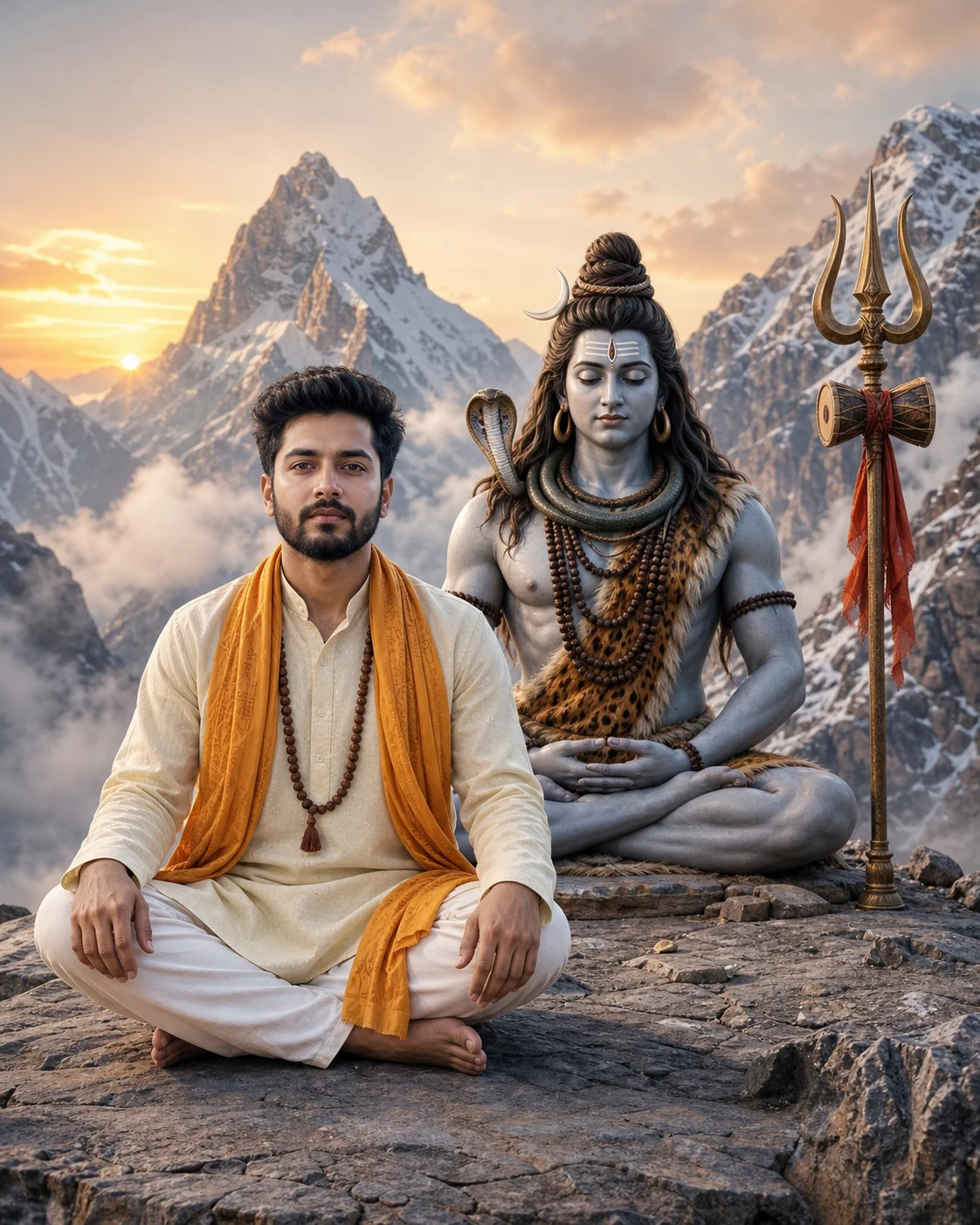
अपनी फोटो upload करके हिमालय में महादेव के पास ध्यान करते हुए AI portrait बनाएँ।
Use my uploaded photo as the identity reference and create a realistic devotional portrait of me meditating beside Lord Shiva in the Himalayas.
Preserve my facial identity as closely as possible to the reference photo. Keep my original face shape, skin tone, eyes, nose, lips, jawline, hairstyle, and facial hair. Retain natural skin texture. Do not beautify, reshape, slim, age, or replace my face. Keep my head angle and expression close to the reference. If my eyes are open in the uploaded photo, keep them open with a calm, peaceful gaze.
Show me sitting cross-legged on a natural stone platform, wearing an ivory kurta with a saffron shawl and rudraksha mala. Place my hands naturally on my knees. Keep my face clearly visible, sharp, and unobstructed.
Show Lord Shiva as a separate divine figure seated beside me, slightly behind, in a peaceful meditation pose. Give him blue-grey skin, matted hair with a crescent moon, rudraksha necklaces, and traditional tiger-skin clothing. Place a complete trishul with a damru beside him.
Do not blend my face with Shiva’s face. Do not turn my skin blue or apply Shiva’s divine features to me.
Use snow-covered Himalayan mountains, gentle morning mist, and warm sunrise lighting. Keep the light on my face soft and neutral, preserving my natural skin tone. Use realistic fabric details, natural anatomy, and a peaceful devotional atmosphere.
Create a vertical 4:5 composition suitable for an Instagram portrait post. Keep both seated figures fully visible with comfortable margins. Keep the entire trishul inside the frame.
No text, logos, watermarks, face distortion, artificial beauty filters, extra fingers, extra limbs, or cropped heads.
Preserve my facial identity as closely as possible to the reference photo. Keep my original face shape, skin tone, eyes, nose, lips, jawline, hairstyle, and facial hair. Retain natural skin texture. Do not beautify, reshape, slim, age, or replace my face. Keep my head angle and expression close to the reference. If my eyes are open in the uploaded photo, keep them open with a calm, peaceful gaze.
Show me sitting cross-legged on a natural stone platform, wearing an ivory kurta with a saffron shawl and rudraksha mala. Place my hands naturally on my knees. Keep my face clearly visible, sharp, and unobstructed.
Show Lord Shiva as a separate divine figure seated beside me, slightly behind, in a peaceful meditation pose. Give him blue-grey skin, matted hair with a crescent moon, rudraksha necklaces, and traditional tiger-skin clothing. Place a complete trishul with a damru beside him.
Do not blend my face with Shiva’s face. Do not turn my skin blue or apply Shiva’s divine features to me.
Use snow-covered Himalayan mountains, gentle morning mist, and warm sunrise lighting. Keep the light on my face soft and neutral, preserving my natural skin tone. Use realistic fabric details, natural anatomy, and a peaceful devotional atmosphere.
Create a vertical 4:5 composition suitable for an Instagram portrait post. Keep both seated figures fully visible with comfortable margins. Keep the entire trishul inside the frame.
No text, logos, watermarks, face distortion, artificial beauty filters, extra fingers, extra limbs, or cropped heads.
5
Please wait...
Preparing prompt action...
If Gemini doesn't auto-fill, just press Ctrl + V to paste the prompt.
How to Customize this Prompt?
Upar Edit Prompt button pe click karein aur niche di gayi details ko apne hisaab se badlein:
- सबसे पहले अपनी clear, बिना filter वाली photo upload करें।
- Photo में चेहरा साफ और बिना किसी रुकावट के दिखना चाहिए।
- “ivory kurta” की जगह अपनी पसंद का कपड़ा और रंग लिखें।“saffron shawl” की जगह अपनी पसंद का shawl color लिखें।
- Instagram post के लिए 4:5 रखें; mobile wallpaper के लिए 9:16 करें।
- यह prompt reference photo support करने वाले AI image tool में इस्तेमाल करें।
- Result में अपना चेहरा जाँचें।